Amazon VPC for Beginners: Subnets, Route Tables, NAT, and Internet Gateways
A practical VPC guide that explains public and private subnets, route tables, internet gateways, NAT gateways, and the exam clues beginners must recognize.
Cloud Conquer Team
AWS Architecture Coach
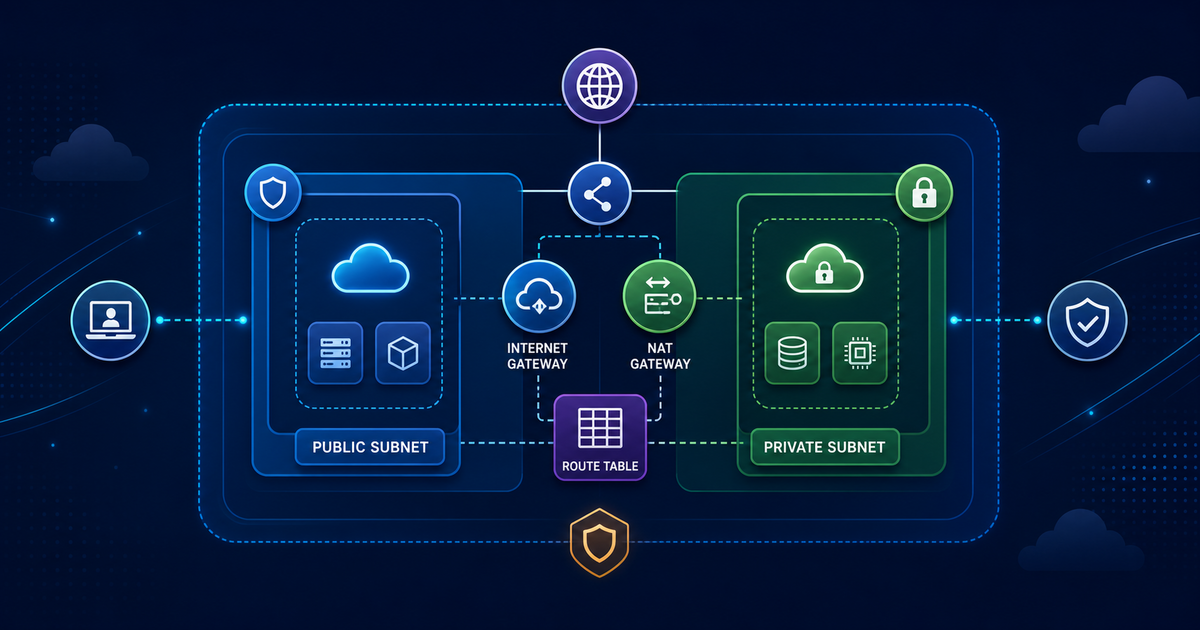
Amazon VPC for Beginners is worth learning because it gives you a reusable decision rule, not just another AWS service name to memorize. This guide is for AWS beginners who can launch EC2 but still feel lost when a subnet is called public or private. By the end, you should be able to understand the VPC mental model well enough to build a small network and answer certification questions.
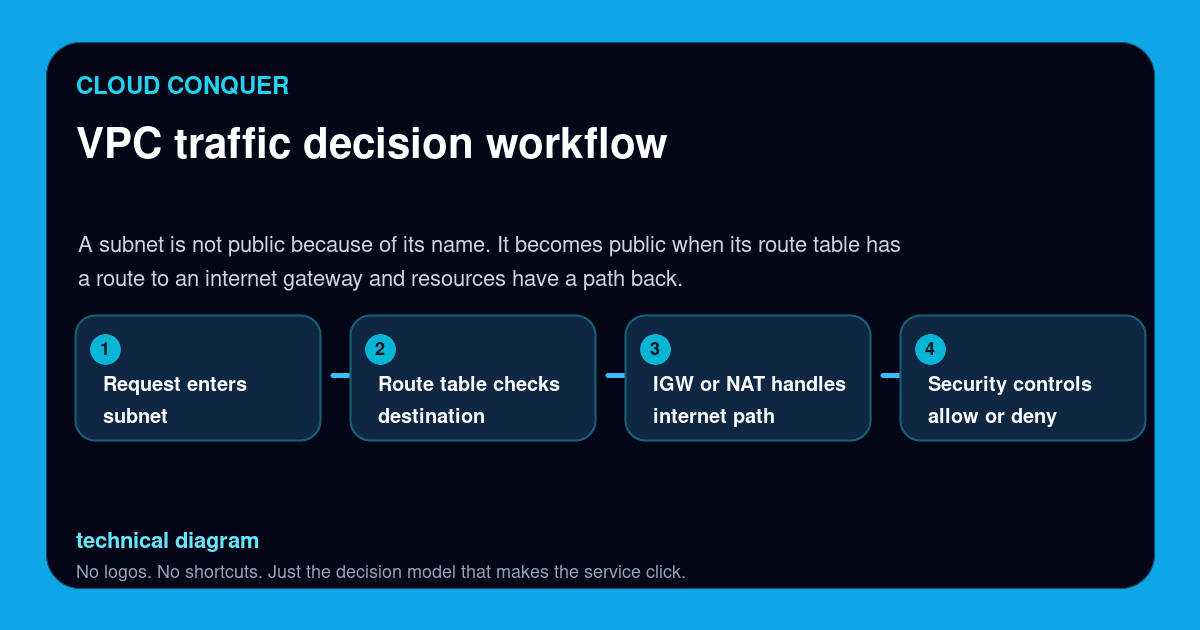
Here is the short version worth saving: A subnet is not public because of its name. It becomes public when its route table has a route to an internet gateway and resources have a path back.
If you are building your AWS study path, connect this article with Amazon EC2 for beginners, AWS Free Tier guide, Solutions Architect Associate study guide, AWS IAM explained for beginners so the concept becomes part of a system instead of a one-off note.
The Mental Model
A VPC is your private network boundary in AWS. Subnets divide that network into smaller address ranges. Route tables decide where traffic goes. Gateways are the doors out of the VPC. Security groups and network ACLs then decide which conversations are allowed.
A good learner can explain the service in plain English before naming every feature. A good certification answer does the same thing under pressure: identify the workload, remove the distractors, then choose the AWS feature that matches the requirement.
Save This Decision Table
| Concept | Simple meaning | Why it matters |
|---|---|---|
| VPC | The private network container | Every network question starts here |
| Subnet | A slice of the VPC CIDR in one Availability Zone | Public versus private subnet clues are common |
| Route table | The map that sends traffic to a target | 0.0.0.0/0 to an internet gateway is the public-subnet clue |
| Internet gateway | The path for internet-routable traffic | Needed for public inbound and outbound access |
| NAT gateway | Outbound internet path for private subnets | Private instances update packages without direct inbound exposure |
This table is the part to share with another learner. It compresses the topic into the decisions that show up in labs, architecture reviews, and exam questions.
The Workflow To Remember
VPC traffic decision workflow:
- Request enters subnet
- Route table checks destination
- IGW or NAT handles internet path
- Security controls allow or deny
Do not skip the order. AWS questions often become difficult because they mix several concepts in one paragraph. When you slow the scenario down into a workflow, the answer usually becomes less mysterious.
A Safe Beginner Lab
- Create one VPC with two public subnets and two private subnets.
- Attach an internet gateway and point the public route table at it.
- Place a NAT gateway in a public subnet and point private outbound traffic at the NAT gateway.
- Launch a tiny test instance only if you understand the cost and cleanup steps.
- Delete the lab resources when finished so the NAT gateway does not keep billing.
The point of the lab is not to create a production-grade environment. The point is to build enough muscle memory that the words in the documentation and the words in practice exams map to something you have actually seen.
Common Mistakes
- Naming a subnet public but forgetting the route to the internet gateway.
- Putting a NAT gateway in a private subnet, which breaks the path it needs to reach the internet.
- Treating security groups as routing tools. They filter traffic, but route tables choose the path.
- Forgetting that high availability usually means spreading subnets across more than one Availability Zone.
These mistakes are common because AWS makes it easy to create resources before you fully understand the boundary between configuration, security, cost, and operations. Slow down at those boundaries. That is where the learning happens.
How This Shows Up In AWS Certifications
Solutions Architect Associate and CloudOps questions often hide VPC knowledge inside availability, security, or troubleshooting scenarios. When a question says a private instance needs outbound software updates, think NAT. When it says a public endpoint must receive internet traffic, think route table plus internet gateway plus security group.
For practice, take any question you miss and rewrite it as a decision sentence. Example: "The workload needs outbound internet access from a private subnet, so I need a NAT path." That habit turns wrong answers into reusable judgment instead of trivia.
Shareable Study Prompt
Use this prompt after reading:
In one paragraph, explain when I would use this AWS concept, what mistake I should avoid, and which certification scenario would test it.
If you cannot answer that cleanly, reread the decision table and redraw the workflow from memory. If you can answer it, move to the next article in the cluster and connect the concept to a real scenario.
Official AWS Sources Used
Next Step
Open Amazon EC2 for beginners, AWS Free Tier guide next. Then answer five practice questions and write down the exact phrase that made each correct answer correct. That small review loop is what turns reading into exam readiness.
Read Next
Continue this AWS learning path
These links are intentionally sequenced to move readers from fundamentals to certification-ready topics.
Amazon EC2 for Beginners: Instances, AMIs, Security Groups, and When to Use It
A practical beginner guide to EC2 instance basics, AMIs, security groups, pricing models, and when EC2 is a better fit than serverless.
AWS Solutions Architect Associate Study Guide 2026
A focused 2026 SAA-C03 study guide covering the services, trade-offs, and study order that matter most for a first-pass result.
AWS Free Tier Guide 2026: How to Learn AWS Without Surprise Bills
A practical guide to using the AWS Free Tier safely while learning core services, building labs, and preparing for beginner AWS certifications.
AWS Security Basics for Beginners: IAM, KMS, Security Groups, and Least Privilege
A practical AWS security basics guide that explains IAM, least privilege, KMS, security groups, shared responsibility, and the exam clues beginners should know.